Sunday, March 27, 2016

Easter Bunny's Egg House

Happy Easter! Sharing the egg house boxes I created for giving to family and friends for Easter this year. I had been eyeing this egg house box from SVG Cuts for the longest time, thinking it was so cute but always thinking it would take too much time and effort to make. Since I got started early on Easter projects this year, I decided to take the plunge and give these a try...yup, they took a little much time to put together, but oh, so much FUN!

I made ten of these boxes...and honestly, for me the hardest the part and what took up the most time was deciding on which papers to use. Ended up using a combination of printed papers from Echo Park (Bundle of Joy), Bo Bunny (Double Dot), Lasting Impressions (Plaids) together with digital papers I purchased online over at Etsy.

Once all the papers were printed and cut, the assembly of these boxes took time, but wasn't too hard. Mary over at SVG Cuts has an assembly video posted on her site which helped alot, and with ten of these to make, by the time I was half way through, I was getting faster at it. One change I did make to the original cut file was to increase the height of the box by half an inch because I wanted to be sure it would be deep enough to hold at least six pizzelle cookies.

I also added Mr. and Mrs. Bunny! Idea for this comes from the adorable egg house boxes created by Nadia of Glittering Eyes blog a few years back.  My bunnies for my boxes are from the "Easter Title and Bunnies" cutting file from My Scrap Chick. Cut them out on plain white cardstock and colored them with Copics...much easier and faster than having to load and reload all the different colored papers for each piece to be cut on the Silhouette. I used the grassy borders die from Die-namics for the grass under the windows and a Punch Bunch mini daisy punch for the flowers. Flower embellishments on the tops of the eggs are a combination of  petals from silk flowers I took apart and flowers from All Natural Accents and Prima.

Then at the last minute, I thought it might be cool to make a window box to put the egg boxes in. Used Make the Cut to design the boxes, having to keep it really simple since I was running out of time. I totally enjoyed making these egg house boxes. Mary at SVG Cuts does an awesome job of creating cutting files that even I can put together! What's really neat is how you can completely change it up by the papers you select...from vintage to elegant to whimsical...so FUN!
Hope everyone is having a fabulous and fun Easter weekend! Have a few more Easter projects to share but will save for next time.

Sunday, March 6, 2016

Kawaii Kokeshi

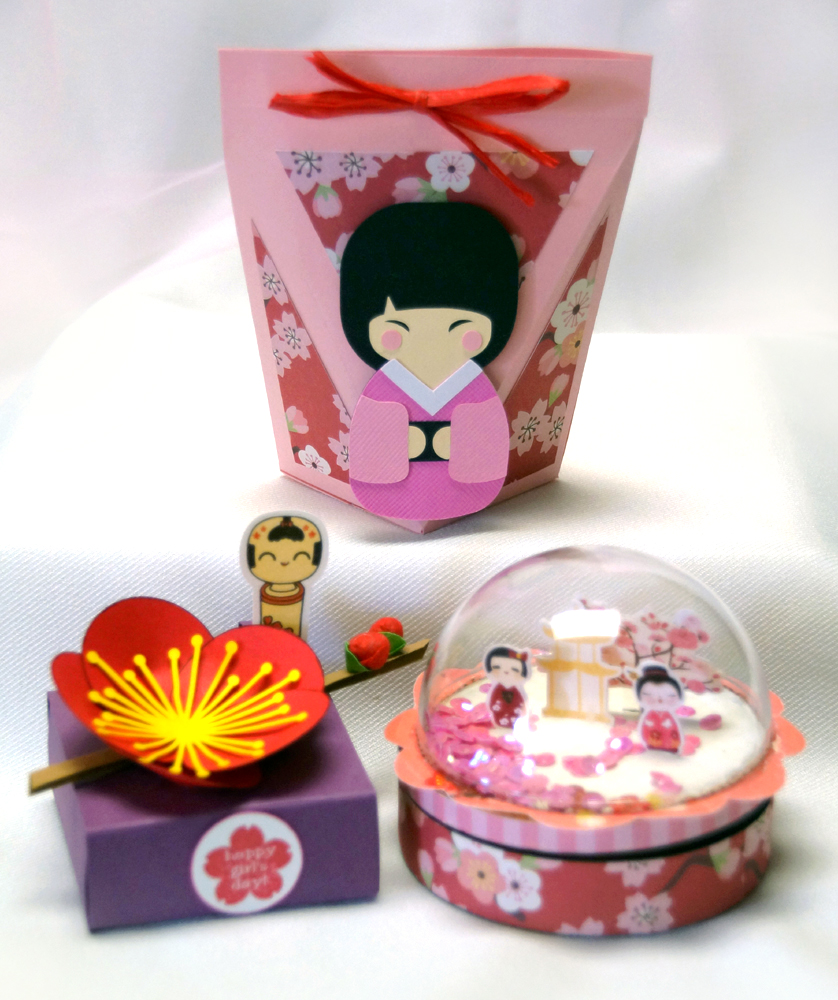
Sharing a trio of super kawaii kokeshi treats today, given to me by three of my sweetest crafting buddies.

I just LOVE this really neat shaped treat bag created by my dear friend Kris.The unique triangular shaped panels on this gives this bag some very cool dimension and really makes the adorable little paper pieced kokeshi stand out! Love the pretty sakura paper Kris used on the panels and red rafia bow to keep the bag closed. The paper pieced kokeshi girl Kris used on her bag comes from a freebie set called "Kyoto Kuties" from Lettering Delights and you can find many tutorials for this neat bag by doing an internet search for "Fancy V Self Closing Bag".


On Girls Day, sweet Lorna brought by pretty plum blossom adorned treat boxes for each of us at work. 
Lorna did a wonderful job of decorating these boxes...love the beautiful bold plum blossom with buds and the image of the cute wooden kokeshi in the background for a perfect finishing added designer's touch!  Lorna told us that the inspiration for decorating her boxes came from seeing images of  pretty Japanese wagashi or tea confections beautifully shaped and decorated to look like flowers.

This totally amazing treat box is a creation from Patti, of Creations By Patti blog. I'm very embarrassed to admit that this little treasure was given to me nearly 6 months ago but I had such a difficult time taking a picture of it because of the glare on the dome that I nearly forgot to post this. 

Patti created this beautiful "snowglobe" trinket box by covering a round candy container with patterned papers and adhering a plastic dome onto its lid. Inside the dome are miniature kokeshi, pagoda and a cherry tree from the "Cherry Delight" collection from My Little Shoebox. Gently turn the box over and pretty pink iridescent sequins fall like sakura petals around the kokeshi. So pretty!!! You can learn more details on how this was made and see more views of this amazing project by visiting Patti's blog here
Hope you enjoyed and are inspired by these kawaii kokeshi projects from my talented and creative crafty friends! 


Thursday, March 3, 2016

Treat Boxes for Girls Day

Today is Girls Day or "Hina Matsuri" in Japan, also known as "Doll Festival". To celebrate, I made these kimono girl treat boxes and filled them with rice cakes or "mochi" to share with friends.

The inspiration to make these boxes comes from some cute bear shaped "onigiri" or rice ball boxes I spied on Pinterest from a Japanese design concept site called "h concept" found here. Using the Make the Cut design program, I tried to create a template similar to the onigiri boxes but taller to look more like the body of  kimono clad doll.

I added a head and hands, and covered the box with washi paper so it would look like a kimono. Slits were cut in the hands to allow the hands to slide into each other and keep the box closed.


Sliding the hands apart opens the box to get to the goodies inside! Coming up with the template for this box was a bit of a challenge, but once that was done, decorating and putting these treat boxes together was fun. Thanks for dropping by to visit, and wishing you all a Happy Girls Day!

Saturday, February 20, 2016

A Card To Amuse Dad

Still catching up on posting birthday cards from last year. This one was made for my dad who turned 92 in November. Always a challenge to come up with guy cards...LOL, even harder to think up a card for an OLD guy! Decided to make a Magic Color Card for him, hoping that he might be amused by it.
I chose to use good ol' Mickey Mouse for his card...Mickey turned 82 years old in November, so he's nearly as old as dad...and even tho dad's memory isn't so good anymore, I figured he'd still remember Mickey Mouse, right? I used a coloring book image of Mickey found on the internet and added the "92" behind him  Found some old vintage Mickey Mouse scrapbook paper in my stash which I thought might be fun to use as a background.

Pull up on the Mouse head shaped tab at the top of the card and Mickey disappears from the window...

...and re-appears at the top of the card all colored in! Always a fun card to give, and not too hard to put together. I used the tutorial by Beate Johns found here at Splitcoast Stampers.

As it turns out, dad was more amazed to learn he was 92 years old than with the color changing card. "Wow!!! I'm 92 ?!!! Wow, I'm old, huh" Happy Birthday, Dad...we love you.

Saturday, February 13, 2016

Splurge a Little...It's Your Birthday!

Happy Valentines Day! I didn't make anything for Valentines Day this year since we were away on vacation, but in the spirit of Valentines Day, this card does have a few hearts on it! This is the card I sent to my daughter for her birthday back in October, but haven't had the chance to post due to all the busyness and excitement of the holidays at that time. For her card, I went with an ice cream theme since she and I both have an insatiable love for ice cream...guess it must be in the genes. I found what I thought would be the perfect cutting file set for her card called "Cool Treats" over at Marjorie Ann Designs.

Doily and ice cream are from "Cool Treats" and "Lacey Doily" cutting files from My Scrap Chick; and "Splurge" was created in Make the Cut using Ballerina font.


Using the tutorial from Norma's "From My Craft Room" I made this into another Peek A Boo Slider Card. As the card is opened, a panel with a different image slides over the bear with the ice cream scoop...

...and here's the card fully open.

All the paper piecings on this card were cut from white cardstock and colored with Copics. Background panels were embossed using a Cuttlebug folder called Juli's Garden. Similar to the Peek A Boo Slider card I made earlier, I added a spine to this card to try to prevent the paper pieced images from getting snagged as it slides open. You can find the details here. Having much fun learning to make this type of slider card! Hope to do more soon!

Monday, February 8, 2016

Swinging In with the Year of the Monkey


Happy Chinese New Year! Today marks the beginning of the Year of the Monkey so I made batches of Oriental Crispex snacks and put them in the same take out boxes I we used for giving our Chex mix during Christmas.

This time I tagged the boxes with a Year of the Monkey tag. I used the "Gone Bananas" cutting file from Marjorie Ann Designs for my monkey and welded together cherry blossoms from Cricut "Pagoda" cartridge to create the border. The numbers for "2016" is Arial font rendered into a cutting file with Make the Cut (MTC) program. Tag was cut using a metal die from Lawn Fawn's "Stitched Circle Tag" set. I really like that it doesn't take much to make these take out boxes to look festive enough for holiday giving...just some ribbon and a cute tag!

Also made a bunch of these refrigerator magnet calendars to go along with the treats. Actually, this is the project I had originally created for our annual Cricut Club share project. Made 30 of these calendars for our Cricut Club project, another dozen donated to mom's Senior Citizen Club craft fair, and 30 more for giving to friends and family at New Years.

I used a combination of Arial and Bergamo fonts to do the "2016", using MTC to create a cut file and shadows for it. The red base background layer was created by welding a shadow of the "2016" to a rectangle shape. Adorable little hanging monkey is from the Cricut "Life's A Party" cartridge. Found a traceable image of the kanji character "saru" or "monkey" on the web and had MTC create a cut file for that as well. Added that to a small circle as a medallion for the monkey to hold.
Then for a bit of whimsy, I attached the monkey to the calendar using a small brad. allowing him to swing from side to side. Fun!
Speaking of fun...

...couldn't go without sharing these two AMAZING New Years goodies from my super wonderful and talented crafty friends, Kris and Lorna!

No question about it, Lorna once again got squeals of delight from all of us when she brought these fabulous daruma treat holders to our workplace. I thought the colors and details on her Daruma doll face and body were really well done! I love how she added the kanji character for "kotobuki" which is the symbol for "celebration, long life, happiness" to her daruma and the branch of glittery sakura blossoms. Hard to see in the photos but even the holder itself has been embossed with an Asian wave pattern. Inside, a yummilicious rice cracker!

And how about this super ADORABLE pillow box holder filled with sweet treats shared by Kris at our last Cricut Club meeting?  Kris' little monkey is a cutting file from Miss Kate's Cuttables....isn't he the cutest thing ever? Love how she embossed the red belly band with the weave embossing folder from Cuttlebug's Asian bundle for a perfect festive touch!

Okay! Looks like even our little Latte is dressed and ready to celebrate the start of a brand New Year! Gung Hay Fat Choy! Best wishes and congratulations to all for a wonderful prosperous New Year!

Saturday, January 30, 2016

Simple Thank You's

I know it's very bad of me, but I'm usually so wiped out after the holidays that I get too lazy to make thank you cards. Instead I end up buying thank you cards or just emailing a short note. In my effort to try to self improve and make good on at least one New Years Resolution  this year, I came up with these simple thank you cards which didn't take too long to make thanks to my Silhouette Cameo and Make the Cut design program.

The base of the card was created by welding the word "thank you" using Pharmacy font.between two rectangular shapes in the Make the Cut (MTC) program. and cut using the Silhouette Cameo. Finally got a chance to use my cutie Mama Elephant panda stamps!

On the inside... a strip of rainbow colored paper created with the Print Shop publishing program which doubles as the background for my "thank you" on the front and a border for the panda inside. So easy, but still kinda cute, no? I really should consider making a bunch of these to keep on hand whenever I need them...